PHP
Dynamic page logic, custom forms and processors, API integrations, product tools, quote workflows and server-side functionality.
UX • Accessibility • Analytics • Conversion • Ongoing Improvement
A website should do more than look current. It should help people find what they need, make the next step easier and give you useful evidence about where the experience can improve.
MusiGraphics combines web design, accessibility, analytics, customer-journey tracking and practical development so the site can keep improving as real visitors use it.
What We Actually Work On
Design matters, but it is only one part of whether a website helps someone understand the offer, find the right product and take the next step.
Navigation, page hierarchy, content flow, mobile usability, calls to action and the steps visitors take to complete a task.
Accessible structure and interaction patterns, semantic markup, keyboard considerations, form usability and WCAG-informed improvements.
GA4 event planning, traffic analysis, campaign attribution and measurement focused on meaningful actions rather than pageviews alone.
Track how visitors move from entry page to product exploration, tools, calls, forms and other conversion actions.
Use behavioral evidence to improve calls to action, forms, product pages and decision paths instead of relying only on opinion.
Practical PHP, HTML, CSS and JavaScript development for sites that need more than a template or brochure-style page.
Web Development Stack
We do not force every website into the same platform.
MusiGraphics works directly in PHP, JavaScript and CSS when a project needs custom functionality, integrations or a more tailored user experience.
We also work with WordPress + Elementor when the priority is an editor-friendly content management system that makes ongoing page updates easier for the client.
The technology should support the business goal—not become the goal.
Dynamic page logic, custom forms and processors, API integrations, product tools, quote workflows and server-side functionality.
Interactive tools, selectors, calculators, guided journeys, UI behavior, event tracking and custom conversion flows.
Responsive layouts, branded interfaces, accessible focus states, mobile behavior and the visual system that holds the experience together.
Editor-friendly websites, reusable page sections, landing pages and ongoing content updates without sacrificing structure or usability.
Ongoing Website Work • Nick's Building Supply
For a considered purchase, the website has to do more than show products. It should help visitors understand choices, find guidance, use tools, move toward a quote and give the business useful signals about what happens along the way.
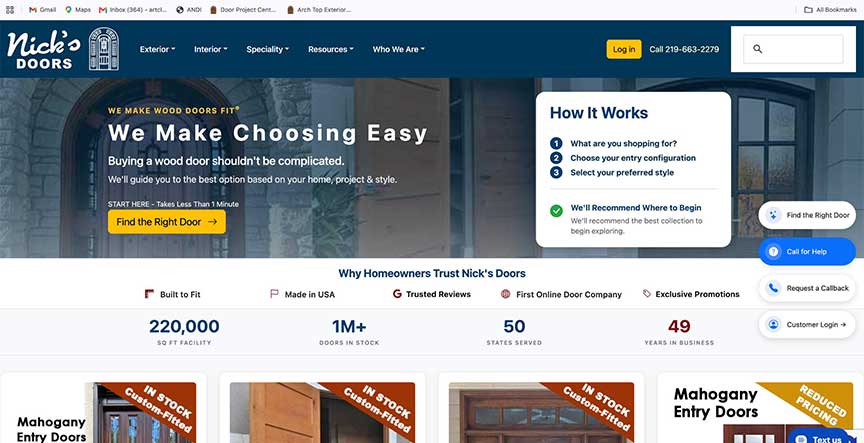
The homepage now guides visitors toward the right door, explains how the process works, surfaces trust signals and makes product exploration easier—while analytics and journey tracking show us what to improve next.
Structure navigation and content around what visitors are trying to accomplish—not the company's internal organization.
GA4 and the Visitor Journey Framework can track progress such as CTA clicks, calls, downloads, tool use and completed inquiries.
Use behavioral evidence to decide what page, form, tool or interaction deserves the next round of improvement.
VJF Framework
Traditional analytics can tell you that someone viewed a page. That does not necessarily tell you whether the page helped them make progress.
For Nick's, we use a custom Visitor Journey Framework (VJF) to create a more useful measurement layer around important customer actions and stages of the website journey.
Events can distinguish actions such as starting a journey, moving through steps, using a tool, selecting a collection, clicking a call to action, calling, emailing, downloading information or submitting a quote/project form.
That makes analytics more actionable: instead of asking only “How much traffic did this page get?” we can ask “What did visitors do next?”
Examples of Journey Signals
journey_start
A visitor begins an intentional path.
journey_step
The visitor progresses through a guided experience.
cta_click
A primary call to action receives engagement.
phone_click
A visitor chooses to call.
download
A guide or measuring resource is downloaded.
collection_click
A visitor moves into a product collection.
quote_submit
A quote request is completed.
project_submitted
A project inquiry reaches completion.
UX & Conversion
A conversion problem is often a clarity problem. Visitors may not know what to choose, what information they need or what happens after they click.
Organize products and resources around what customers are trying to find—not the company's internal terminology.
Calculators, guides, selectors and project tools can reduce uncertainty before a visitor contacts sales.
Use consistent language and placement so visitors understand the primary next step throughout the site.
Ask for information that helps the business respond while avoiding unnecessary friction for the customer.
Website Accessibility
We incorporate accessibility considerations into website structure, content and interactions with the goal of making the experience more usable for more people.
That includes attention to semantic HTML, heading structure, meaningful link text, image alternatives, keyboard interaction, form labels, focus behavior, contrast and responsive usability.
For existing websites, accessibility work can also be approached as an ongoing review and remediation process rather than a single automated score.
WCAG-Informed Improvements
Analytics + Behavior
Analytics becomes much more useful when it is connected to specific questions about customer behavior.
We use measurement to investigate issues such as which pages contribute to inquiries, where visitors abandon a journey, whether a tool is being used, whether a campaign generated meaningful actions and which pages deserve the next round of improvement.
Ongoing Optimization
Website improvement does not always require another complete redesign. Often the better approach is to identify a real problem, improve it, measure the result and continue.
Review analytics, visitor behavior, search patterns, form activity and business feedback.
Find a page, interaction or customer question that appears to be creating friction.
Change the content, UX, tracking, tool, CTA or page structure around that specific problem.
Watch what happens after the change and use the new evidence to decide what comes next.
A Good Fit For
This approach is especially useful when the website supports a considered purchase, lead-generation process, complex product line or customer journey that cannot be explained with a few generic pages.
Customers need education, comparison or guidance before requesting a quote.
Phone calls, inquiries and quote submissions are important business outcomes.
The site already has traffic and content but needs better structure, measurement or conversion.
Email, direct mail, search or other campaigns need landing pages and reliable attribution.
Calculators, selectors, visualizers, guides or workflows can help customers make progress.
The organization wants accessibility considered as part of ongoing website quality.
Website Project
Tell us about the website, the customer journey and the business result you're trying to improve. An existing site is often the best place to start.
Web Design FAQ
Web Design + Ongoing Improvement
Build a clearer customer journey, measure the actions that matter and keep improving the experience with evidence from real visitors.
Discuss Your Website